> ## Documentation Index
> Fetch the complete documentation index at: https://docs-dev-fix-docs-5525.mintlify.site/llms.txt
> Use this file to discover all available pages before exploring further.

> Configure an update policy form using Forms for Actions

# Use Cases: Configure an update policy form using Forms

<Card title="Before you start">
  1. Create a [Machine-to-Machine Application](/docs/get-started/auth0-overview/create-applications/machine-to-machine-apps) with the following scopes enabled:

  * `read:users`
  * `update:users`
  * `create:users`
  * `read:users_app_metadata`
  * `update:users_app_metadata`
  * `create:users_app_metadata`

  2. Add a [Vault connection](/docs/customize/forms/vault) using the M2M application credentials.
</Card>

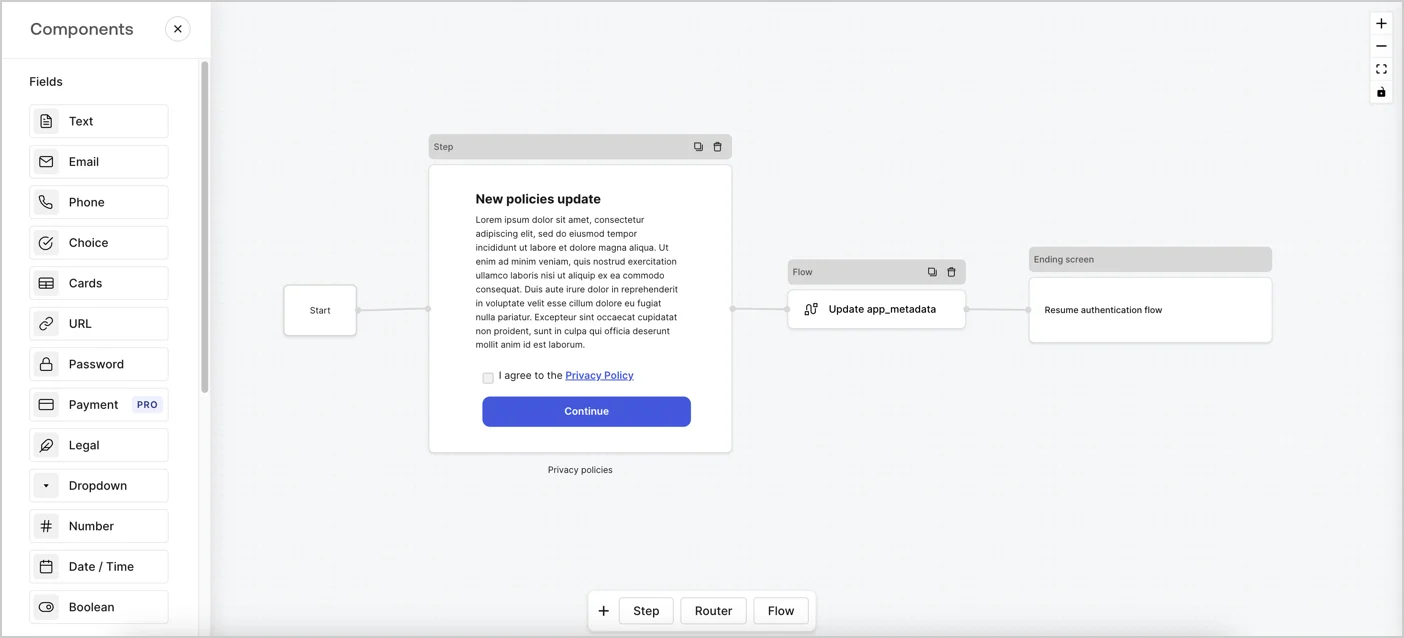
Forms for Actions allows you to create custom privacy policies flows and store the consent under the `app_metadata` object.
<Frame>
  <img src="https://mintcdn.com/docs-dev-fix-docs-5525/7HWJb3VtZ0tg6qtH/docs/images/cdy7uua7fh8z/6i68dMvHDTijfRmSgN1x8Q/ad900e7d4c0fb34645921435472b8684/privavy-policy-form.png?fit=max&auto=format&n=7HWJb3VtZ0tg6qtH&q=85&s=ee9b048b5142f83913f68c3028322770" alt="Dashboard > Actions > Forms > Privacy policy use case" data-og-width="1404" width="1404" data-og-height="638" height="638" data-path="docs/images/cdy7uua7fh8z/6i68dMvHDTijfRmSgN1x8Q/ad900e7d4c0fb34645921435472b8684/privavy-policy-form.png" data-optimize="true" data-opv="3" srcset="https://mintcdn.com/docs-dev-fix-docs-5525/7HWJb3VtZ0tg6qtH/docs/images/cdy7uua7fh8z/6i68dMvHDTijfRmSgN1x8Q/ad900e7d4c0fb34645921435472b8684/privavy-policy-form.png?w=280&fit=max&auto=format&n=7HWJb3VtZ0tg6qtH&q=85&s=0d2c16f9771f76bd4129c0a69d6fccf6 280w, https://mintcdn.com/docs-dev-fix-docs-5525/7HWJb3VtZ0tg6qtH/docs/images/cdy7uua7fh8z/6i68dMvHDTijfRmSgN1x8Q/ad900e7d4c0fb34645921435472b8684/privavy-policy-form.png?w=560&fit=max&auto=format&n=7HWJb3VtZ0tg6qtH&q=85&s=07b9b14822dcb6a27963ea2c972ce0a1 560w, https://mintcdn.com/docs-dev-fix-docs-5525/7HWJb3VtZ0tg6qtH/docs/images/cdy7uua7fh8z/6i68dMvHDTijfRmSgN1x8Q/ad900e7d4c0fb34645921435472b8684/privavy-policy-form.png?w=840&fit=max&auto=format&n=7HWJb3VtZ0tg6qtH&q=85&s=434db5ad512d70084ebef255806beb1b 840w, https://mintcdn.com/docs-dev-fix-docs-5525/7HWJb3VtZ0tg6qtH/docs/images/cdy7uua7fh8z/6i68dMvHDTijfRmSgN1x8Q/ad900e7d4c0fb34645921435472b8684/privavy-policy-form.png?w=1100&fit=max&auto=format&n=7HWJb3VtZ0tg6qtH&q=85&s=198f716c07b67145cb7e0c4c6dad12ce 1100w, https://mintcdn.com/docs-dev-fix-docs-5525/7HWJb3VtZ0tg6qtH/docs/images/cdy7uua7fh8z/6i68dMvHDTijfRmSgN1x8Q/ad900e7d4c0fb34645921435472b8684/privavy-policy-form.png?w=1650&fit=max&auto=format&n=7HWJb3VtZ0tg6qtH&q=85&s=1cb6ea760c50acb6761fddbbe65b9bf1 1650w, https://mintcdn.com/docs-dev-fix-docs-5525/7HWJb3VtZ0tg6qtH/docs/images/cdy7uua7fh8z/6i68dMvHDTijfRmSgN1x8Q/ad900e7d4c0fb34645921435472b8684/privavy-policy-form.png?w=2500&fit=max&auto=format&n=7HWJb3VtZ0tg6qtH&q=85&s=439ddc46399ac4dc57e149b444505d7d 2500w" />
</Frame>

The sections below outline how you can create an Update Policy form using nodes and flows, along with steps for adding your form to a [Post Login](/docs/customize/actions/explore-triggers/signup-and-login-triggers/login-trigger) Action.

## Create a form from scratch

Follow these steps to create a form to gather information:

1. Open the Form editor by selecting **Auth0 Dashboard > Actions > Forms.**
2. Select **Create Form** > **Start from scratch**.

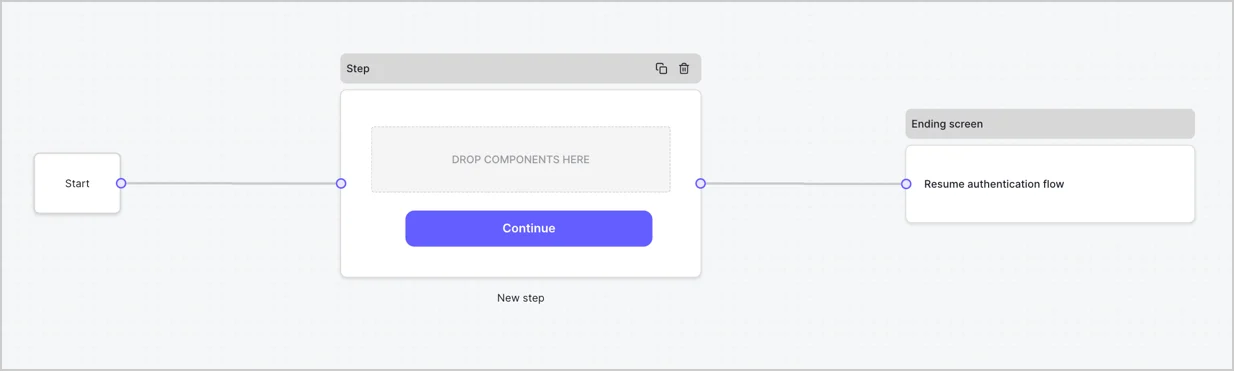
By default, a new form contains a Start node, a Step node, and an Ending screen node.
<Frame>
  <img src="https://mintcdn.com/docs-dev-fix-docs-5525/T15ZVZ3aI_EXAI6-/docs/images/cdy7uua7fh8z/2TZ9jSjgEcARFpULI6hz4R/a4319a1bd482f2ee5cc23100fdb2f42c/New-form-Forms-for-action-use-case.png?fit=max&auto=format&n=T15ZVZ3aI_EXAI6-&q=85&s=056bcbff3b59ab3fcc5e7beeeff837ec" alt="Dashboard > Forms > Use Cases > Form" data-og-width="1234" width="1234" data-og-height="371" height="371" data-path="docs/images/cdy7uua7fh8z/2TZ9jSjgEcARFpULI6hz4R/a4319a1bd482f2ee5cc23100fdb2f42c/New-form-Forms-for-action-use-case.png" data-optimize="true" data-opv="3" srcset="https://mintcdn.com/docs-dev-fix-docs-5525/T15ZVZ3aI_EXAI6-/docs/images/cdy7uua7fh8z/2TZ9jSjgEcARFpULI6hz4R/a4319a1bd482f2ee5cc23100fdb2f42c/New-form-Forms-for-action-use-case.png?w=280&fit=max&auto=format&n=T15ZVZ3aI_EXAI6-&q=85&s=f8d18e0c5ee236d6412930f11cadbef8 280w, https://mintcdn.com/docs-dev-fix-docs-5525/T15ZVZ3aI_EXAI6-/docs/images/cdy7uua7fh8z/2TZ9jSjgEcARFpULI6hz4R/a4319a1bd482f2ee5cc23100fdb2f42c/New-form-Forms-for-action-use-case.png?w=560&fit=max&auto=format&n=T15ZVZ3aI_EXAI6-&q=85&s=558c8cae85413ba1229db577d088c30e 560w, https://mintcdn.com/docs-dev-fix-docs-5525/T15ZVZ3aI_EXAI6-/docs/images/cdy7uua7fh8z/2TZ9jSjgEcARFpULI6hz4R/a4319a1bd482f2ee5cc23100fdb2f42c/New-form-Forms-for-action-use-case.png?w=840&fit=max&auto=format&n=T15ZVZ3aI_EXAI6-&q=85&s=e62d7280af7ccd4fdaa51b8391ae1f70 840w, https://mintcdn.com/docs-dev-fix-docs-5525/T15ZVZ3aI_EXAI6-/docs/images/cdy7uua7fh8z/2TZ9jSjgEcARFpULI6hz4R/a4319a1bd482f2ee5cc23100fdb2f42c/New-form-Forms-for-action-use-case.png?w=1100&fit=max&auto=format&n=T15ZVZ3aI_EXAI6-&q=85&s=05c2dc264bdede86462eea246810dd1b 1100w, https://mintcdn.com/docs-dev-fix-docs-5525/T15ZVZ3aI_EXAI6-/docs/images/cdy7uua7fh8z/2TZ9jSjgEcARFpULI6hz4R/a4319a1bd482f2ee5cc23100fdb2f42c/New-form-Forms-for-action-use-case.png?w=1650&fit=max&auto=format&n=T15ZVZ3aI_EXAI6-&q=85&s=a6c2b34bee94c8008a9e8ac39e6c1a64 1650w, https://mintcdn.com/docs-dev-fix-docs-5525/T15ZVZ3aI_EXAI6-/docs/images/cdy7uua7fh8z/2TZ9jSjgEcARFpULI6hz4R/a4319a1bd482f2ee5cc23100fdb2f42c/New-form-Forms-for-action-use-case.png?w=2500&fit=max&auto=format&n=T15ZVZ3aI_EXAI6-&q=85&s=7c8f925a403507111dee89d203d759a2 2500w" />
</Frame>

### Configure the Step node

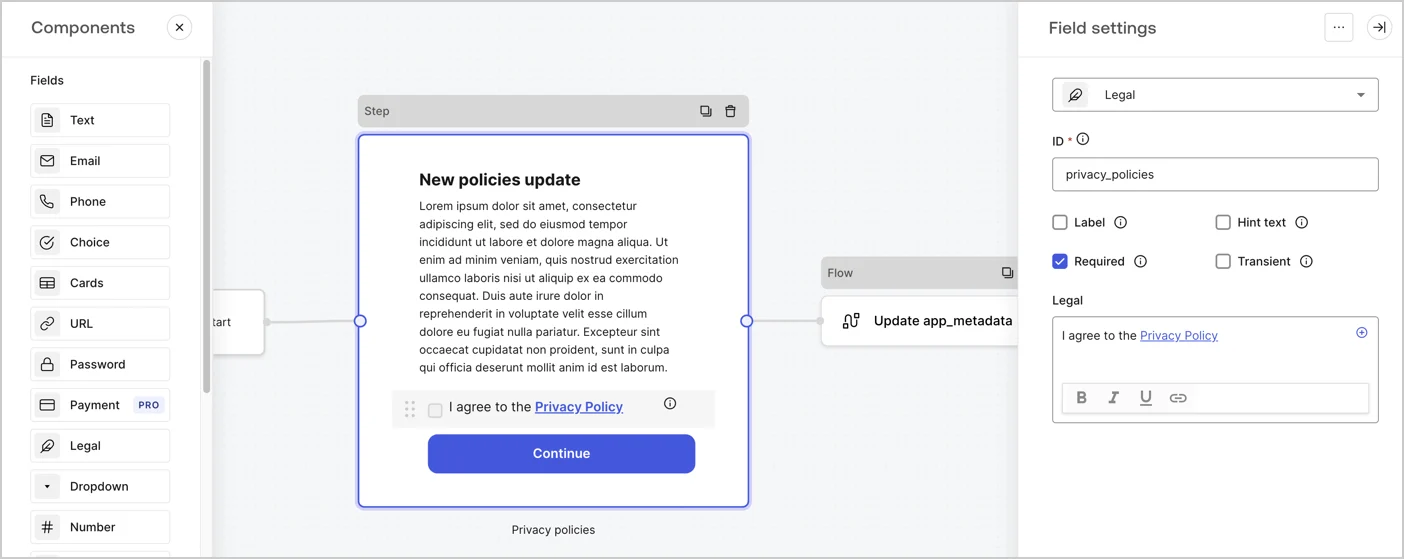
The Step node is the graphical interface visible to users. Add [Fields](/docs/customize/forms/nodes-and-components) to the Step node to collect the new agreement acceptance value by following these steps:

1. Drag a **Rich text** field from the **Components menu** into the **Step** node.

   * **Rich text**: Enter a description of your privacy policies updates.
   * Select **Save**.
2. Drag a **Legal** field into the **Step** node.

   * **ID**: Enter `privacy_policies`.
   * **Required**: Enable the checkbox.
   * **Legal**: Enter `I agree to the Privacy Policy`.
   * Select **Save**.
3. Select **Publish** to save.
<Frame>
  <img src="https://mintcdn.com/docs-dev-fix-docs-5525/Le4Ta_lQW68XNkaf/docs/images/cdy7uua7fh8z/59zFFjQjAnjogkc2QGIqqJ/0ad66b1b636544122aa4e65968b76c2c/privacy-policy-step-node.png?fit=max&auto=format&n=Le4Ta_lQW68XNkaf&q=85&s=998f1e1070c54e331d519eb9c03d55e9" alt="Dashboard > Actions > Forms > Use case privacy policy step node" data-og-width="1404" width="1404" data-og-height="559" height="559" data-path="docs/images/cdy7uua7fh8z/59zFFjQjAnjogkc2QGIqqJ/0ad66b1b636544122aa4e65968b76c2c/privacy-policy-step-node.png" data-optimize="true" data-opv="3" srcset="https://mintcdn.com/docs-dev-fix-docs-5525/Le4Ta_lQW68XNkaf/docs/images/cdy7uua7fh8z/59zFFjQjAnjogkc2QGIqqJ/0ad66b1b636544122aa4e65968b76c2c/privacy-policy-step-node.png?w=280&fit=max&auto=format&n=Le4Ta_lQW68XNkaf&q=85&s=d393119f86fef755e12af2059bfd721c 280w, https://mintcdn.com/docs-dev-fix-docs-5525/Le4Ta_lQW68XNkaf/docs/images/cdy7uua7fh8z/59zFFjQjAnjogkc2QGIqqJ/0ad66b1b636544122aa4e65968b76c2c/privacy-policy-step-node.png?w=560&fit=max&auto=format&n=Le4Ta_lQW68XNkaf&q=85&s=ea6deec75100c764405fa1eb01f0ae4a 560w, https://mintcdn.com/docs-dev-fix-docs-5525/Le4Ta_lQW68XNkaf/docs/images/cdy7uua7fh8z/59zFFjQjAnjogkc2QGIqqJ/0ad66b1b636544122aa4e65968b76c2c/privacy-policy-step-node.png?w=840&fit=max&auto=format&n=Le4Ta_lQW68XNkaf&q=85&s=2b3683f01d9294c8edd3b8fe6a987faf 840w, https://mintcdn.com/docs-dev-fix-docs-5525/Le4Ta_lQW68XNkaf/docs/images/cdy7uua7fh8z/59zFFjQjAnjogkc2QGIqqJ/0ad66b1b636544122aa4e65968b76c2c/privacy-policy-step-node.png?w=1100&fit=max&auto=format&n=Le4Ta_lQW68XNkaf&q=85&s=d9569c22f6e48c986e3caf4e8eee3626 1100w, https://mintcdn.com/docs-dev-fix-docs-5525/Le4Ta_lQW68XNkaf/docs/images/cdy7uua7fh8z/59zFFjQjAnjogkc2QGIqqJ/0ad66b1b636544122aa4e65968b76c2c/privacy-policy-step-node.png?w=1650&fit=max&auto=format&n=Le4Ta_lQW68XNkaf&q=85&s=a1af0fd8498b54464898f39ffe273a01 1650w, https://mintcdn.com/docs-dev-fix-docs-5525/Le4Ta_lQW68XNkaf/docs/images/cdy7uua7fh8z/59zFFjQjAnjogkc2QGIqqJ/0ad66b1b636544122aa4e65968b76c2c/privacy-policy-step-node.png?w=2500&fit=max&auto=format&n=Le4Ta_lQW68XNkaf&q=85&s=8ca60ac06f75f483f95dc22e810a33f0 2500w" />
</Frame>

### Configure the Flow node

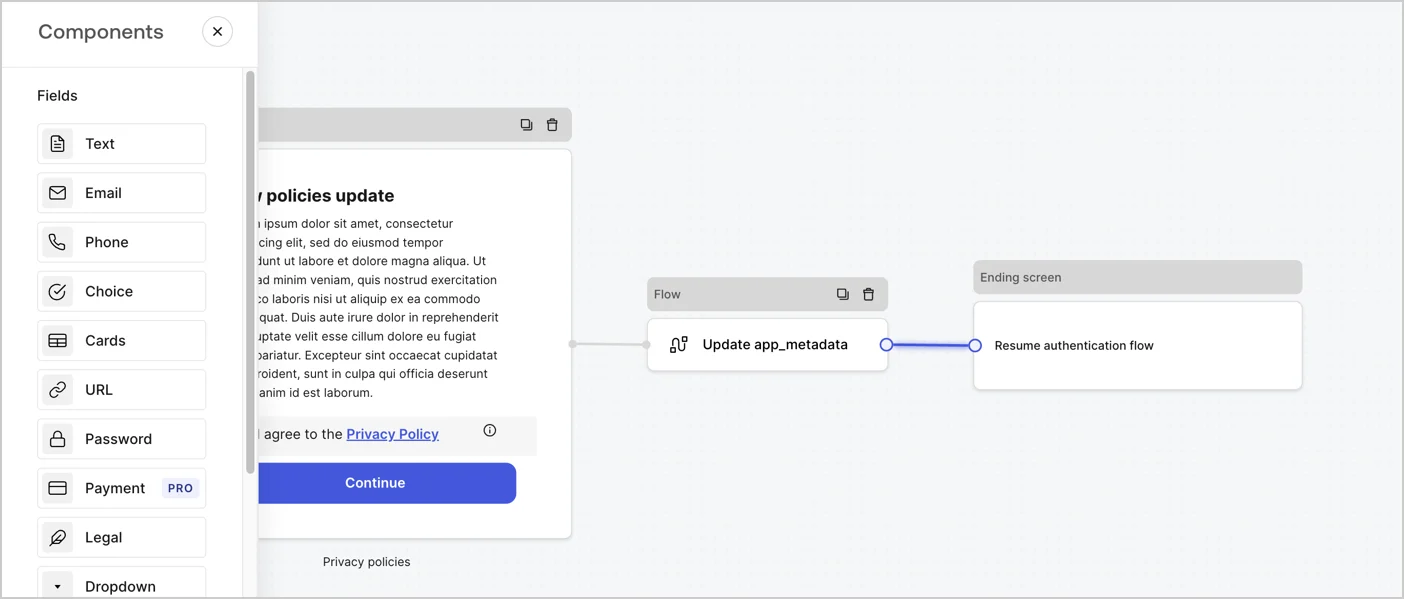
Add a **Flow** node after the **Step** node to update the `app_metadata` and resume the authentication flow by following these steps:

1. Select **Flow** from the bottom of the Form editor.
2. Remove the existing link between the **Step** and **Ending Screen** nodes.
3. Select the new **Flow** > **Click to add a flow** > **Create a new flow.**

   * Enter `Update app_metadata` in the **Name** field.
   * Select **Create**.
   * Select **Save**.
4. Link the **Flow** node to the **Step** and **Ending Screen** nodes as pictured below.
5. Select **Publish** to save.
<Frame>
  <img src="https://mintcdn.com/docs-dev-fix-docs-5525/7HWJb3VtZ0tg6qtH/docs/images/cdy7uua7fh8z/6YIkzm7SrpM9LW76AXuRzh/353c518fe82bbaa440836da1d83596d6/link-policies.png?fit=max&auto=format&n=7HWJb3VtZ0tg6qtH&q=85&s=63cbfd0854fe55b5cb637d084810ea60" alt="Dashboard > Actions > Forms > Form" data-og-width="1404" width="1404" data-og-height="599" height="599" data-path="docs/images/cdy7uua7fh8z/6YIkzm7SrpM9LW76AXuRzh/353c518fe82bbaa440836da1d83596d6/link-policies.png" data-optimize="true" data-opv="3" srcset="https://mintcdn.com/docs-dev-fix-docs-5525/7HWJb3VtZ0tg6qtH/docs/images/cdy7uua7fh8z/6YIkzm7SrpM9LW76AXuRzh/353c518fe82bbaa440836da1d83596d6/link-policies.png?w=280&fit=max&auto=format&n=7HWJb3VtZ0tg6qtH&q=85&s=64ec9669712af6af2d89f9738441601f 280w, https://mintcdn.com/docs-dev-fix-docs-5525/7HWJb3VtZ0tg6qtH/docs/images/cdy7uua7fh8z/6YIkzm7SrpM9LW76AXuRzh/353c518fe82bbaa440836da1d83596d6/link-policies.png?w=560&fit=max&auto=format&n=7HWJb3VtZ0tg6qtH&q=85&s=9ff0f65b954594759bf5f065f3cff43d 560w, https://mintcdn.com/docs-dev-fix-docs-5525/7HWJb3VtZ0tg6qtH/docs/images/cdy7uua7fh8z/6YIkzm7SrpM9LW76AXuRzh/353c518fe82bbaa440836da1d83596d6/link-policies.png?w=840&fit=max&auto=format&n=7HWJb3VtZ0tg6qtH&q=85&s=8b9ed98aa076d983bd829dec22df4b12 840w, https://mintcdn.com/docs-dev-fix-docs-5525/7HWJb3VtZ0tg6qtH/docs/images/cdy7uua7fh8z/6YIkzm7SrpM9LW76AXuRzh/353c518fe82bbaa440836da1d83596d6/link-policies.png?w=1100&fit=max&auto=format&n=7HWJb3VtZ0tg6qtH&q=85&s=4731d8b94445430285930f21bcf00d50 1100w, https://mintcdn.com/docs-dev-fix-docs-5525/7HWJb3VtZ0tg6qtH/docs/images/cdy7uua7fh8z/6YIkzm7SrpM9LW76AXuRzh/353c518fe82bbaa440836da1d83596d6/link-policies.png?w=1650&fit=max&auto=format&n=7HWJb3VtZ0tg6qtH&q=85&s=0daaeb73e60226d47b9c860707136444 1650w, https://mintcdn.com/docs-dev-fix-docs-5525/7HWJb3VtZ0tg6qtH/docs/images/cdy7uua7fh8z/6YIkzm7SrpM9LW76AXuRzh/353c518fe82bbaa440836da1d83596d6/link-policies.png?w=2500&fit=max&auto=format&n=7HWJb3VtZ0tg6qtH&q=85&s=82a508e373ce9ba27f2bf93adaffda4f 2500w" />
</Frame>

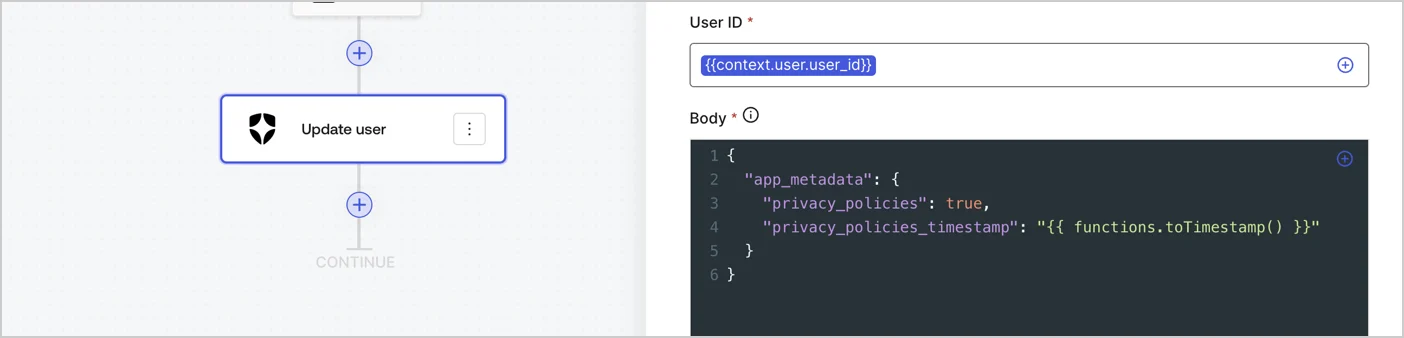
Add an Auth0 Update user action to the flow by following these steps:

1. Select the **Flow** **Update app\_metadata** > **Edit flow** to open the Flow editor in a new tab.
2. Below the StartAction, select the **+** icon to add an **Update user** action. Complete the fields below, then select **Save** to continue.

   * **Connection**: Select from the dropdown the Vault connection to your M2M application.

   * **User ID**: Enter `{{context.user.user_id}}`.

   * **Body**: Copy and paste the following code to update the app\_metadata with the privacy\_policies and privacy\_policies\_timestamp properties.

     ```text lines theme={null}
     {
       "app_metadata": {
         "privacy_policies": true,
         "privacy_policies_timestamp": "{{ functions.toTimestamp() }}"
       }
     }
     ```

   * Select **Save**.
3. Select **Publish** to save.
<Frame>
  <img src="https://mintcdn.com/docs-dev-fix-docs-5525/nKZHd6OMNCEYTNul/docs/images/cdy7uua7fh8z/CvMNIwWrOUwaFW4X3G28p/1fb70ae57a20749d9ffaaba8dc0b7e26/update-user-privacy.png?fit=max&auto=format&n=nKZHd6OMNCEYTNul&q=85&s=de44abb8dddc97cd2e5f3e6dd49d3074" alt="Dashboard > Actions > Forms > User case privacy policy code" data-og-width="1404" width="1404" data-og-height="338" height="338" data-path="docs/images/cdy7uua7fh8z/CvMNIwWrOUwaFW4X3G28p/1fb70ae57a20749d9ffaaba8dc0b7e26/update-user-privacy.png" data-optimize="true" data-opv="3" srcset="https://mintcdn.com/docs-dev-fix-docs-5525/nKZHd6OMNCEYTNul/docs/images/cdy7uua7fh8z/CvMNIwWrOUwaFW4X3G28p/1fb70ae57a20749d9ffaaba8dc0b7e26/update-user-privacy.png?w=280&fit=max&auto=format&n=nKZHd6OMNCEYTNul&q=85&s=d2feed557568c9b03ef2e78fff08dfe2 280w, https://mintcdn.com/docs-dev-fix-docs-5525/nKZHd6OMNCEYTNul/docs/images/cdy7uua7fh8z/CvMNIwWrOUwaFW4X3G28p/1fb70ae57a20749d9ffaaba8dc0b7e26/update-user-privacy.png?w=560&fit=max&auto=format&n=nKZHd6OMNCEYTNul&q=85&s=7cd064b700826bd15f81081d7375670d 560w, https://mintcdn.com/docs-dev-fix-docs-5525/nKZHd6OMNCEYTNul/docs/images/cdy7uua7fh8z/CvMNIwWrOUwaFW4X3G28p/1fb70ae57a20749d9ffaaba8dc0b7e26/update-user-privacy.png?w=840&fit=max&auto=format&n=nKZHd6OMNCEYTNul&q=85&s=2dbfcdb73c550ddb430a8cfeabaaec03 840w, https://mintcdn.com/docs-dev-fix-docs-5525/nKZHd6OMNCEYTNul/docs/images/cdy7uua7fh8z/CvMNIwWrOUwaFW4X3G28p/1fb70ae57a20749d9ffaaba8dc0b7e26/update-user-privacy.png?w=1100&fit=max&auto=format&n=nKZHd6OMNCEYTNul&q=85&s=35594cb7ead002cb5e4ec6f6e2255ec5 1100w, https://mintcdn.com/docs-dev-fix-docs-5525/nKZHd6OMNCEYTNul/docs/images/cdy7uua7fh8z/CvMNIwWrOUwaFW4X3G28p/1fb70ae57a20749d9ffaaba8dc0b7e26/update-user-privacy.png?w=1650&fit=max&auto=format&n=nKZHd6OMNCEYTNul&q=85&s=a470d9675539f1904867b05bfb4604d5 1650w, https://mintcdn.com/docs-dev-fix-docs-5525/nKZHd6OMNCEYTNul/docs/images/cdy7uua7fh8z/CvMNIwWrOUwaFW4X3G28p/1fb70ae57a20749d9ffaaba8dc0b7e26/update-user-privacy.png?w=2500&fit=max&auto=format&n=nKZHd6OMNCEYTNul&q=85&s=eb95a9df002e1a51b57fbe9eceaec4c9 2500w" />
</Frame>

<Callout icon="file-lines" color="#0EA5E9" iconType="regular">
  The flow **Update app\_metadata** adds a `privacy_policies true` value to the app`_metadata` object and also generates a timestamp with a [helper function.](/docs/customize/forms/variables)
</Callout>

## Retrieve the form render code

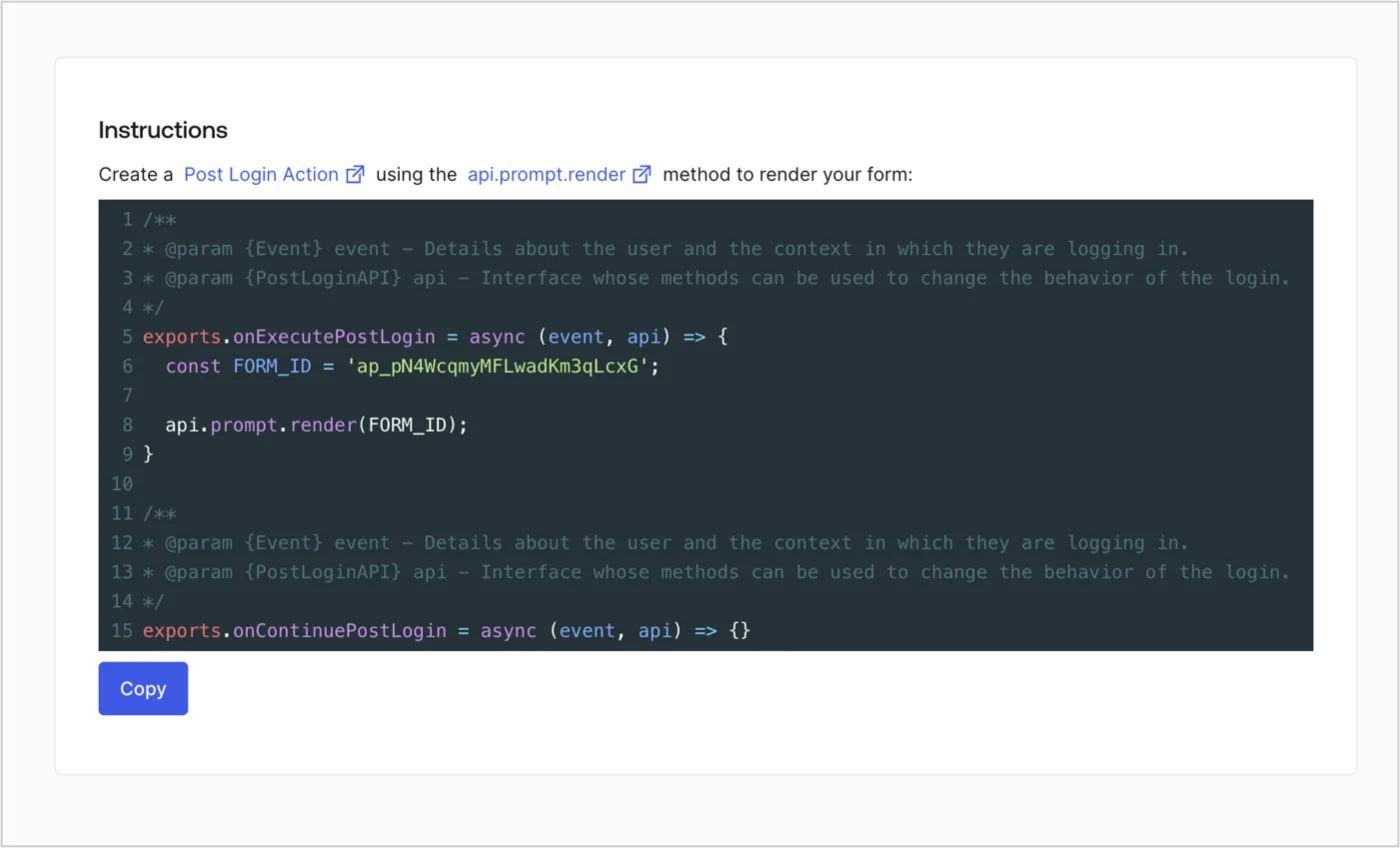
Retrieve your form render code to visually render the form with a custom Post Login Action by following these steps:

* From the Form editor, select **`<> Render`**.
* Select **Copy**.
<Frame>
  <img src="https://mintcdn.com/docs-dev-fix-docs-5525/BQPZ_XPByVvtXhGs/docs/images/cdy7uua7fh8z/2EIUzc539sq9lwoTKbjoJv/496a864c0fc44a782c9cadca119dbfb0/embed.png?fit=max&auto=format&n=BQPZ_XPByVvtXhGs&q=85&s=b2694cd0770e381cfe53a7a40770bcbb" alt="Dashboard > Actions > Forms > Form > Embed" data-og-width="1400" width="1400" data-og-height="848" height="848" data-path="docs/images/cdy7uua7fh8z/2EIUzc539sq9lwoTKbjoJv/496a864c0fc44a782c9cadca119dbfb0/embed.png" data-optimize="true" data-opv="3" srcset="https://mintcdn.com/docs-dev-fix-docs-5525/BQPZ_XPByVvtXhGs/docs/images/cdy7uua7fh8z/2EIUzc539sq9lwoTKbjoJv/496a864c0fc44a782c9cadca119dbfb0/embed.png?w=280&fit=max&auto=format&n=BQPZ_XPByVvtXhGs&q=85&s=493e6f77eb64d6482dc85ca5c373ad5d 280w, https://mintcdn.com/docs-dev-fix-docs-5525/BQPZ_XPByVvtXhGs/docs/images/cdy7uua7fh8z/2EIUzc539sq9lwoTKbjoJv/496a864c0fc44a782c9cadca119dbfb0/embed.png?w=560&fit=max&auto=format&n=BQPZ_XPByVvtXhGs&q=85&s=55080bc877b721a93aa52341c77c49a2 560w, https://mintcdn.com/docs-dev-fix-docs-5525/BQPZ_XPByVvtXhGs/docs/images/cdy7uua7fh8z/2EIUzc539sq9lwoTKbjoJv/496a864c0fc44a782c9cadca119dbfb0/embed.png?w=840&fit=max&auto=format&n=BQPZ_XPByVvtXhGs&q=85&s=1563e6fc7fc1dd8452394fac202f5ffa 840w, https://mintcdn.com/docs-dev-fix-docs-5525/BQPZ_XPByVvtXhGs/docs/images/cdy7uua7fh8z/2EIUzc539sq9lwoTKbjoJv/496a864c0fc44a782c9cadca119dbfb0/embed.png?w=1100&fit=max&auto=format&n=BQPZ_XPByVvtXhGs&q=85&s=1b9755d76c05cba033f3c4ca0ca4d681 1100w, https://mintcdn.com/docs-dev-fix-docs-5525/BQPZ_XPByVvtXhGs/docs/images/cdy7uua7fh8z/2EIUzc539sq9lwoTKbjoJv/496a864c0fc44a782c9cadca119dbfb0/embed.png?w=1650&fit=max&auto=format&n=BQPZ_XPByVvtXhGs&q=85&s=dc02e5ffa5534ec1ac6eb706230e7c3d 1650w, https://mintcdn.com/docs-dev-fix-docs-5525/BQPZ_XPByVvtXhGs/docs/images/cdy7uua7fh8z/2EIUzc539sq9lwoTKbjoJv/496a864c0fc44a782c9cadca119dbfb0/embed.png?w=2500&fit=max&auto=format&n=BQPZ_XPByVvtXhGs&q=85&s=feb3bfa5b4aa53d7afc6242ba5100e16 2500w" />
</Frame>

## Create a Post Login Action

Create a post-login Action to render your form by following these steps:

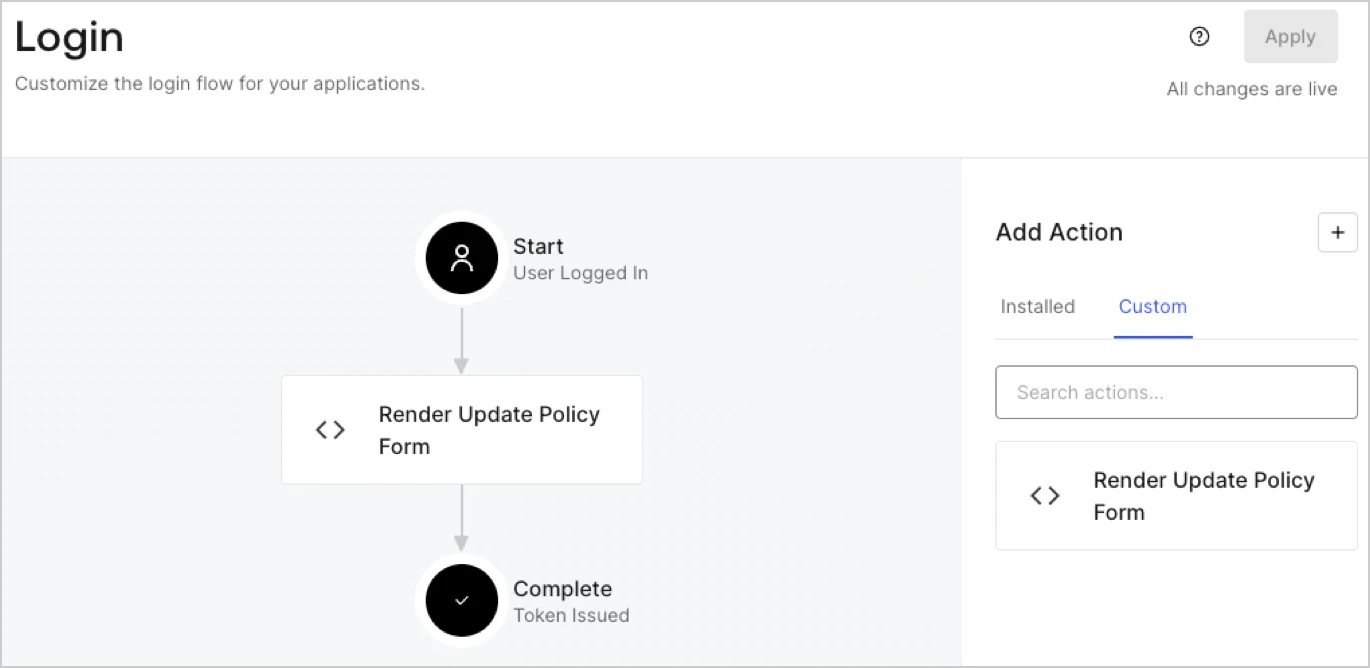
1. Navigate to **Auth0 Dashboard > Actions > Flows > Login.**
2. Select the **+** icon and Select **Build from scratch**:

   * **Name**: Enter `Render Update Policy Form`.
   * **Trigger**: Select `Login / Post Login`.
   * **Runtime**: Select the recommended version.
3. Select **Create**.

To configure the post-login Action:

1. Delete the existing code from the Code editor.
2. Paste the form render code into the Code editor.
3. Edit the code to define the conditional logic that will render the form.

   ```javascript lines theme={null}
   /**
   * @param {Event} event - Details about the user and the context in which they are logging in.
   * @param {PostLoginAPI} api - Interface whose methods can be used to change the behavior of the login.
   */
   exports.onExecutePostLogin = async (event, api) => {
     const FORM_ID = 'REPLACE_WITH_YOUR_FORM_ID';

     if (event.user.app_metadata.privacy_policies !== true) {
       api.prompt.render(FORM_ID);
     }
   }

   exports.onContinuePostLogin = async (event, api) => { }
   ```

   <Callout icon="file-lines" color="#0EA5E9" iconType="regular">
     The example code above will render the form when a user is missing the app metadata `privacy_policies` property.
   </Callout>
4. Select **Deploy.**
5. Drag and Drop the **Render Update Policy Form** Action to the **Login** flow.
   <Frame>
     <img src="https://mintcdn.com/docs-dev-fix-docs-5525/-bnCuJCEr58WA71C/docs/images/cdy7uua7fh8z/5TOwDgevZsBqd7yZynUYWU/41ca909dc3007aed4f40ff794a05efa5/postlogin.png?fit=max&auto=format&n=-bnCuJCEr58WA71C&q=85&s=ed86046443983c7cd0f9bfa0da25e93a" alt="Dashboard > Forms > Use Case > Render update policy form login action" data-og-width="1370" width="1370" data-og-height="668" height="668" data-path="docs/images/cdy7uua7fh8z/5TOwDgevZsBqd7yZynUYWU/41ca909dc3007aed4f40ff794a05efa5/postlogin.png" data-optimize="true" data-opv="3" srcset="https://mintcdn.com/docs-dev-fix-docs-5525/-bnCuJCEr58WA71C/docs/images/cdy7uua7fh8z/5TOwDgevZsBqd7yZynUYWU/41ca909dc3007aed4f40ff794a05efa5/postlogin.png?w=280&fit=max&auto=format&n=-bnCuJCEr58WA71C&q=85&s=82d6be9e52029597ddc9dbf0ddfb44f0 280w, https://mintcdn.com/docs-dev-fix-docs-5525/-bnCuJCEr58WA71C/docs/images/cdy7uua7fh8z/5TOwDgevZsBqd7yZynUYWU/41ca909dc3007aed4f40ff794a05efa5/postlogin.png?w=560&fit=max&auto=format&n=-bnCuJCEr58WA71C&q=85&s=432aa501e8484493904e612446872824 560w, https://mintcdn.com/docs-dev-fix-docs-5525/-bnCuJCEr58WA71C/docs/images/cdy7uua7fh8z/5TOwDgevZsBqd7yZynUYWU/41ca909dc3007aed4f40ff794a05efa5/postlogin.png?w=840&fit=max&auto=format&n=-bnCuJCEr58WA71C&q=85&s=17598784d45b42d361b2603c4a4ae8a1 840w, https://mintcdn.com/docs-dev-fix-docs-5525/-bnCuJCEr58WA71C/docs/images/cdy7uua7fh8z/5TOwDgevZsBqd7yZynUYWU/41ca909dc3007aed4f40ff794a05efa5/postlogin.png?w=1100&fit=max&auto=format&n=-bnCuJCEr58WA71C&q=85&s=f5759b4a8b95af4e685e1c1e6234d8bd 1100w, https://mintcdn.com/docs-dev-fix-docs-5525/-bnCuJCEr58WA71C/docs/images/cdy7uua7fh8z/5TOwDgevZsBqd7yZynUYWU/41ca909dc3007aed4f40ff794a05efa5/postlogin.png?w=1650&fit=max&auto=format&n=-bnCuJCEr58WA71C&q=85&s=65b4561232683ca8143c43eb0be515cb 1650w, https://mintcdn.com/docs-dev-fix-docs-5525/-bnCuJCEr58WA71C/docs/images/cdy7uua7fh8z/5TOwDgevZsBqd7yZynUYWU/41ca909dc3007aed4f40ff794a05efa5/postlogin.png?w=2500&fit=max&auto=format&n=-bnCuJCEr58WA71C&q=85&s=1edba48ae9fa7e817349c20b58acf91c 2500w" />
   </Frame>
6. Select **Apply.**

### Test implementation

Test the implementation by following these steps:

1. Log in with an existing user whose app`_metadata` attribute `privacy_policies` does not have a value.
2. The post-login Action in the Login flow will render the form and prompt for acceptance.
3. Select **Auth0 Dashboard > User Management > Users,** locate the user and verify that the `app_metadata` attribute `privacy_policies` contains a `true` value and a timestamp.
