> ## Documentation Index
> Fetch the complete documentation index at: https://docs-dev-fix-docs-5525.mintlify.site/llms.txt
> Use this file to discover all available pages before exploring further.

> Describes how to use the Vault of Forms for Actions.

# Vaults

The vault lets you securely store secrets or common settings (for example: API keys, <Tooltip tip="Access Token: Authorization credential, in the form of an opaque string or JWT, used to access an API." cta="View Glossary" href="/docs/glossary?term=access+tokens">access tokens</Tooltip>, <Tooltip tip="Access Token: Authorization credential, in the form of an opaque string or JWT, used to access an API." cta="View Glossary" href="/docs/glossary?term=refresh+tokens">refresh tokens</Tooltip>) to authenticate requests with external services or integrations as vault connections.

<Callout icon="file-lines" color="#0EA5E9" iconType="regular">
  * There are connections that require the user to provide credentials (for example, with an Auth0 with a machine-to-machine (M2M) application, you generate an access token with an expiration time and a refresh token). The connection stores both tokens and generates a new access token before it expires.
  * There are external services that require authorizing scopes to generate API credentials. If you change the scopes, update the connection to those services to avoid connection issues.
  * When a connection is added, it is ready to use in your flows. Any updates to an existing connection will propagate automatically.
</Callout>

## Create and modify vault connections

Create and modify vault connections from the vault page or from the flow editor when an action requires credentials.

### Create vault connections from the vault page

Add a vault connection from the vault page by following these steps:

1. Open the Form editor by selecting **Auth0 Dashboard > Actions > Forms.**
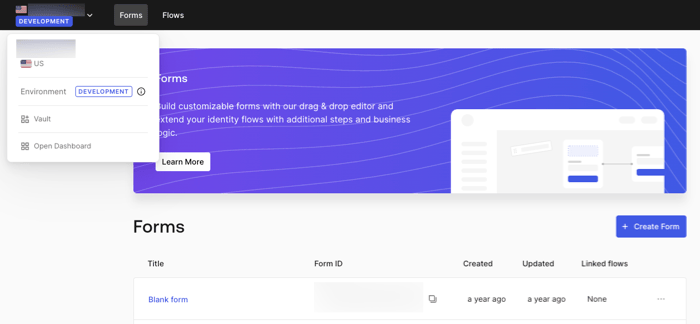
2. From the top left corner, select the tenant menu, and then **Vault** to open the vault page.
   <Frame>
     <img src="https://mintcdn.com/docs-dev-fix-docs-5525/BQPZ_XPByVvtXhGs/docs/images/cdy7uua7fh8z/1sPNPKO6nuEDCuiYGRWSur/d85dc616170eaf2d7d5f321750863ccf/vault-connection.png?fit=max&auto=format&n=BQPZ_XPByVvtXhGs&q=85&s=268417620e86da3b961d7ed9f17a103e" alt="Dashboard > Forms > Vault" data-og-width="700" width="700" data-og-height="324" height="324" data-path="docs/images/cdy7uua7fh8z/1sPNPKO6nuEDCuiYGRWSur/d85dc616170eaf2d7d5f321750863ccf/vault-connection.png" data-optimize="true" data-opv="3" srcset="https://mintcdn.com/docs-dev-fix-docs-5525/BQPZ_XPByVvtXhGs/docs/images/cdy7uua7fh8z/1sPNPKO6nuEDCuiYGRWSur/d85dc616170eaf2d7d5f321750863ccf/vault-connection.png?w=280&fit=max&auto=format&n=BQPZ_XPByVvtXhGs&q=85&s=13990528b8dc7386273939fd4eac40c4 280w, https://mintcdn.com/docs-dev-fix-docs-5525/BQPZ_XPByVvtXhGs/docs/images/cdy7uua7fh8z/1sPNPKO6nuEDCuiYGRWSur/d85dc616170eaf2d7d5f321750863ccf/vault-connection.png?w=560&fit=max&auto=format&n=BQPZ_XPByVvtXhGs&q=85&s=49c474f47ad4c32874f3f914212dcac0 560w, https://mintcdn.com/docs-dev-fix-docs-5525/BQPZ_XPByVvtXhGs/docs/images/cdy7uua7fh8z/1sPNPKO6nuEDCuiYGRWSur/d85dc616170eaf2d7d5f321750863ccf/vault-connection.png?w=840&fit=max&auto=format&n=BQPZ_XPByVvtXhGs&q=85&s=a889d2b654ea7d6e0786cdad673ad15f 840w, https://mintcdn.com/docs-dev-fix-docs-5525/BQPZ_XPByVvtXhGs/docs/images/cdy7uua7fh8z/1sPNPKO6nuEDCuiYGRWSur/d85dc616170eaf2d7d5f321750863ccf/vault-connection.png?w=1100&fit=max&auto=format&n=BQPZ_XPByVvtXhGs&q=85&s=82c9c202f9a731d18fccec2572e3cfcb 1100w, https://mintcdn.com/docs-dev-fix-docs-5525/BQPZ_XPByVvtXhGs/docs/images/cdy7uua7fh8z/1sPNPKO6nuEDCuiYGRWSur/d85dc616170eaf2d7d5f321750863ccf/vault-connection.png?w=1650&fit=max&auto=format&n=BQPZ_XPByVvtXhGs&q=85&s=4d5341a430aa3357fdfdba021cfdc5d9 1650w, https://mintcdn.com/docs-dev-fix-docs-5525/BQPZ_XPByVvtXhGs/docs/images/cdy7uua7fh8z/1sPNPKO6nuEDCuiYGRWSur/d85dc616170eaf2d7d5f321750863ccf/vault-connection.png?w=2500&fit=max&auto=format&n=BQPZ_XPByVvtXhGs&q=85&s=84c59b94ad8cb580b03278a87abacfa2 2500w" />
   </Frame>
3. Select **Add Vault Connection**.
4. Select the desired action and **Continue**.
5. Add a vault **Connection name** and select **Continue**.
6. Enter the credentials.
   If you don't have the specific credentials, you can select **Create an empty connection** and add the credentials later. Empty connections have an orange icon indicating missing credentials.
7. select **Add Vault Connection**.

### Create vault connections from the flow editor

Add a vault connection from a flow action, for example: Twilio by following these steps:

1. Open the Flow editor by selecting **Auth0 Dashboard > Actions > Forms > Flows**
2. Select a flow and add a **Send SMS with Twilio** action.
3. From the **Vault connection** setting of the action, select the **+** Icon.

   <Frame>
     <img src="https://mintcdn.com/docs-dev-fix-docs-5525/LahHmipI4w3ItRq5/docs/images/cdy7uua7fh8z/1AsaznhRKxm5LZxPlcbfUw/10e5a8af700aab909f5b03fcd266da7e/twilio-vault-connection.png?fit=max&auto=format&n=LahHmipI4w3ItRq5&q=85&s=e8b2e081713fcb8f218b8f3a3094f703" alt="Dashboard > Forms > Vault " data-og-width="1104" width="1104" data-og-height="191" height="191" data-path="docs/images/cdy7uua7fh8z/1AsaznhRKxm5LZxPlcbfUw/10e5a8af700aab909f5b03fcd266da7e/twilio-vault-connection.png" data-optimize="true" data-opv="3" srcset="https://mintcdn.com/docs-dev-fix-docs-5525/LahHmipI4w3ItRq5/docs/images/cdy7uua7fh8z/1AsaznhRKxm5LZxPlcbfUw/10e5a8af700aab909f5b03fcd266da7e/twilio-vault-connection.png?w=280&fit=max&auto=format&n=LahHmipI4w3ItRq5&q=85&s=13a8d4fd819c7748470e4a2bc4b148f6 280w, https://mintcdn.com/docs-dev-fix-docs-5525/LahHmipI4w3ItRq5/docs/images/cdy7uua7fh8z/1AsaznhRKxm5LZxPlcbfUw/10e5a8af700aab909f5b03fcd266da7e/twilio-vault-connection.png?w=560&fit=max&auto=format&n=LahHmipI4w3ItRq5&q=85&s=0bf9bcbe01dd1ddcdab6917af2cb820b 560w, https://mintcdn.com/docs-dev-fix-docs-5525/LahHmipI4w3ItRq5/docs/images/cdy7uua7fh8z/1AsaznhRKxm5LZxPlcbfUw/10e5a8af700aab909f5b03fcd266da7e/twilio-vault-connection.png?w=840&fit=max&auto=format&n=LahHmipI4w3ItRq5&q=85&s=9803119712563b56efdcd720b555c714 840w, https://mintcdn.com/docs-dev-fix-docs-5525/LahHmipI4w3ItRq5/docs/images/cdy7uua7fh8z/1AsaznhRKxm5LZxPlcbfUw/10e5a8af700aab909f5b03fcd266da7e/twilio-vault-connection.png?w=1100&fit=max&auto=format&n=LahHmipI4w3ItRq5&q=85&s=bdddbf3beb6efccbc59e18fdab3ec057 1100w, https://mintcdn.com/docs-dev-fix-docs-5525/LahHmipI4w3ItRq5/docs/images/cdy7uua7fh8z/1AsaznhRKxm5LZxPlcbfUw/10e5a8af700aab909f5b03fcd266da7e/twilio-vault-connection.png?w=1650&fit=max&auto=format&n=LahHmipI4w3ItRq5&q=85&s=290f0d53a397af4f9954e289e0662819 1650w, https://mintcdn.com/docs-dev-fix-docs-5525/LahHmipI4w3ItRq5/docs/images/cdy7uua7fh8z/1AsaznhRKxm5LZxPlcbfUw/10e5a8af700aab909f5b03fcd266da7e/twilio-vault-connection.png?w=2500&fit=max&auto=format&n=LahHmipI4w3ItRq5&q=85&s=4b987bf0e6be1738daee887426d97ee1 2500w" />
   </Frame>
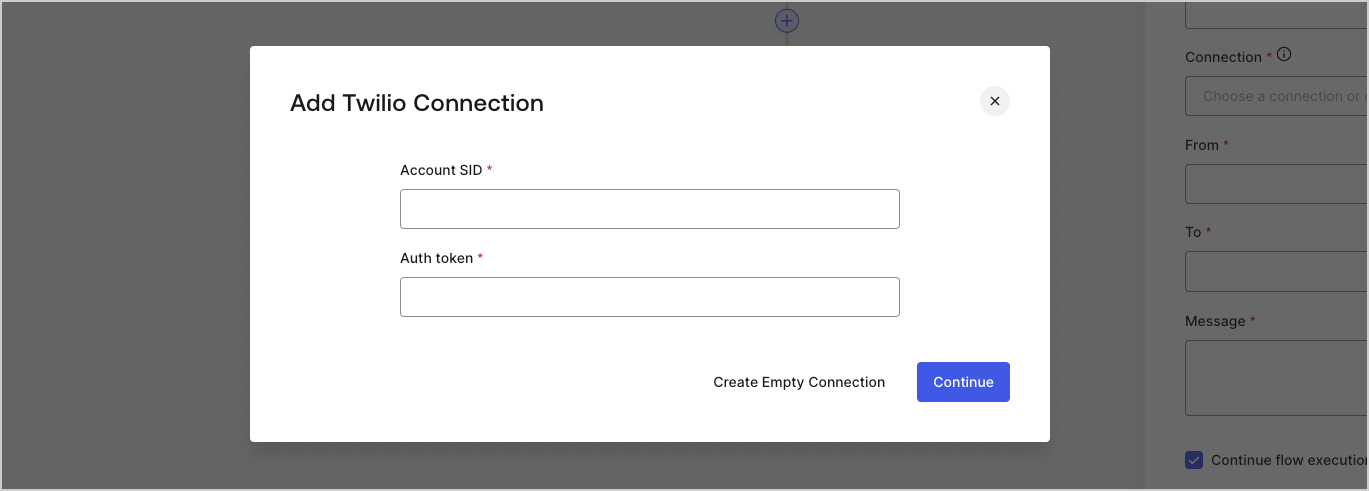
4. Add a vault **Connection name** and select **Continue**.
5. Enter the credentials.
   If you don't have the specific credentials, you can select **Create an empty connection** and add the credentials later. Empty connections have an orange icon indicating missing credentials.
   <Frame>
     <img src="https://mintcdn.com/docs-dev-fix-docs-5525/4k_GObj3r1NHFQPm/docs/images/cdy7uua7fh8z/yobXanutPRCO3FWek8cOk/bc29e39fb8593cff35e2738234bfe6fe/twilio-vault-settings.png?fit=max&auto=format&n=4k_GObj3r1NHFQPm&q=85&s=25fc5a62b7e8d0ba772deebc18b08a47" alt="Dashboard > Forms > Vault > Twilio connection settings" data-og-width="1369" width="1369" data-og-height="491" height="491" data-path="docs/images/cdy7uua7fh8z/yobXanutPRCO3FWek8cOk/bc29e39fb8593cff35e2738234bfe6fe/twilio-vault-settings.png" data-optimize="true" data-opv="3" srcset="https://mintcdn.com/docs-dev-fix-docs-5525/4k_GObj3r1NHFQPm/docs/images/cdy7uua7fh8z/yobXanutPRCO3FWek8cOk/bc29e39fb8593cff35e2738234bfe6fe/twilio-vault-settings.png?w=280&fit=max&auto=format&n=4k_GObj3r1NHFQPm&q=85&s=a232fdbe5269a2f62c1aa686c0de0dae 280w, https://mintcdn.com/docs-dev-fix-docs-5525/4k_GObj3r1NHFQPm/docs/images/cdy7uua7fh8z/yobXanutPRCO3FWek8cOk/bc29e39fb8593cff35e2738234bfe6fe/twilio-vault-settings.png?w=560&fit=max&auto=format&n=4k_GObj3r1NHFQPm&q=85&s=36e6c3f37abc7507f24c08c193c05ccc 560w, https://mintcdn.com/docs-dev-fix-docs-5525/4k_GObj3r1NHFQPm/docs/images/cdy7uua7fh8z/yobXanutPRCO3FWek8cOk/bc29e39fb8593cff35e2738234bfe6fe/twilio-vault-settings.png?w=840&fit=max&auto=format&n=4k_GObj3r1NHFQPm&q=85&s=4dd95f30aaac3da16e008ee853982212 840w, https://mintcdn.com/docs-dev-fix-docs-5525/4k_GObj3r1NHFQPm/docs/images/cdy7uua7fh8z/yobXanutPRCO3FWek8cOk/bc29e39fb8593cff35e2738234bfe6fe/twilio-vault-settings.png?w=1100&fit=max&auto=format&n=4k_GObj3r1NHFQPm&q=85&s=ddf0f78811aee2a201585f7781f32bc8 1100w, https://mintcdn.com/docs-dev-fix-docs-5525/4k_GObj3r1NHFQPm/docs/images/cdy7uua7fh8z/yobXanutPRCO3FWek8cOk/bc29e39fb8593cff35e2738234bfe6fe/twilio-vault-settings.png?w=1650&fit=max&auto=format&n=4k_GObj3r1NHFQPm&q=85&s=ec404769ae0d895379732487a0471c3f 1650w, https://mintcdn.com/docs-dev-fix-docs-5525/4k_GObj3r1NHFQPm/docs/images/cdy7uua7fh8z/yobXanutPRCO3FWek8cOk/bc29e39fb8593cff35e2738234bfe6fe/twilio-vault-settings.png?w=2500&fit=max&auto=format&n=4k_GObj3r1NHFQPm&q=85&s=ed761043f84aceb9ae0b54e26d407296 2500w" />
   </Frame>
6. Select **Add Vault Connection.**
