> ## Documentation Index
> Fetch the complete documentation index at: https://docs-dev-fix-docs-5525.mintlify.site/llms.txt
> Use this file to discover all available pages before exploring further.
# MFA用OTP通知を構成する
> MFA用に時間ベースのワンタイムパスワード(OTP)通知を構成する方法を説明します。
認証要素としてワンタイムパスワード(OTP)を使用するには、ユーザーは以下のようなAuthenticatorアプリを使う必要があります。
* Authy([Google Play](https://play.google.com/store/apps/details?id=com.authy.authy) / [App Store](https://itunes.apple.com/us/app/authy/id494168017))。
* Google Authenticator([Google Play](https://play.google.com/store/apps/details?id=com.google.android.apps.authenticator2) / [App Store](https://itunes.apple.com/us/app/google-authenticator/id388497605))。
* Auth0 Guardian([Google Play](https://play.google.com/store/apps/details?id=com.auth0.guardian) / [App Store](https://itunes.apple.com/us/app/auth0-guardian/id1093447833))。
* Microsoft Authenticator([Google Play](https://play.google.com/store/apps/details?id=com.azure.authenticator) / [App Store](https://itunes.apple.com/us/app/microsoft-authenticator/id983156458))
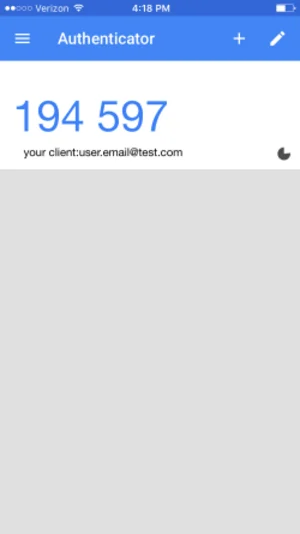
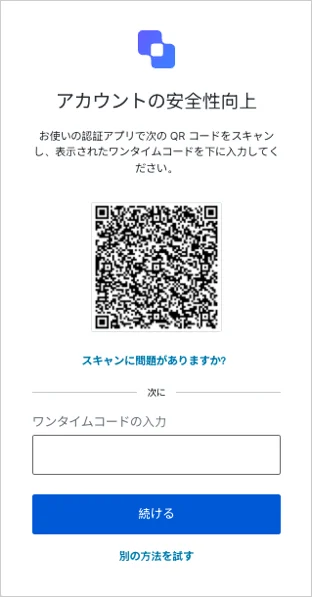 サインアップ後、コードをスキャンしてアプリをセットアップするとワンタイムコードの生成が開始されます。その後、アプリにログインすると、現時点でのワンタイムコードをAuthenticatorアプリで簡単にチェックできます。
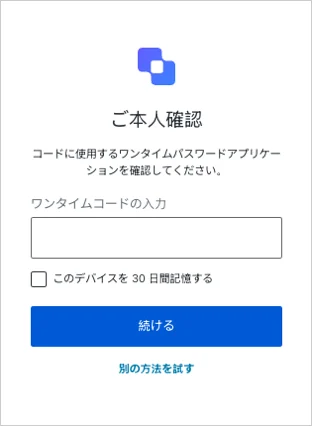
 ユーザーはプロンプトに従ってコードを入力します。
 ユーザーは、モバイルデバイスにOTP Authenticatorアプリをインストールする必要があります。
## もっと詳しく
* [OTP Authenticatorの登録とチャレンジ](/docs/ja-jp/secure/multi-factor-authentication/authenticate-using-ropg-flow-with-mfa/enroll-and-challenge-otp-authenticators)
ユーザーは、モバイルデバイスにOTP Authenticatorアプリをインストールする必要があります。
## もっと詳しく
* [OTP Authenticatorの登録とチャレンジ](/docs/ja-jp/secure/multi-factor-authentication/authenticate-using-ropg-flow-with-mfa/enroll-and-challenge-otp-authenticators)